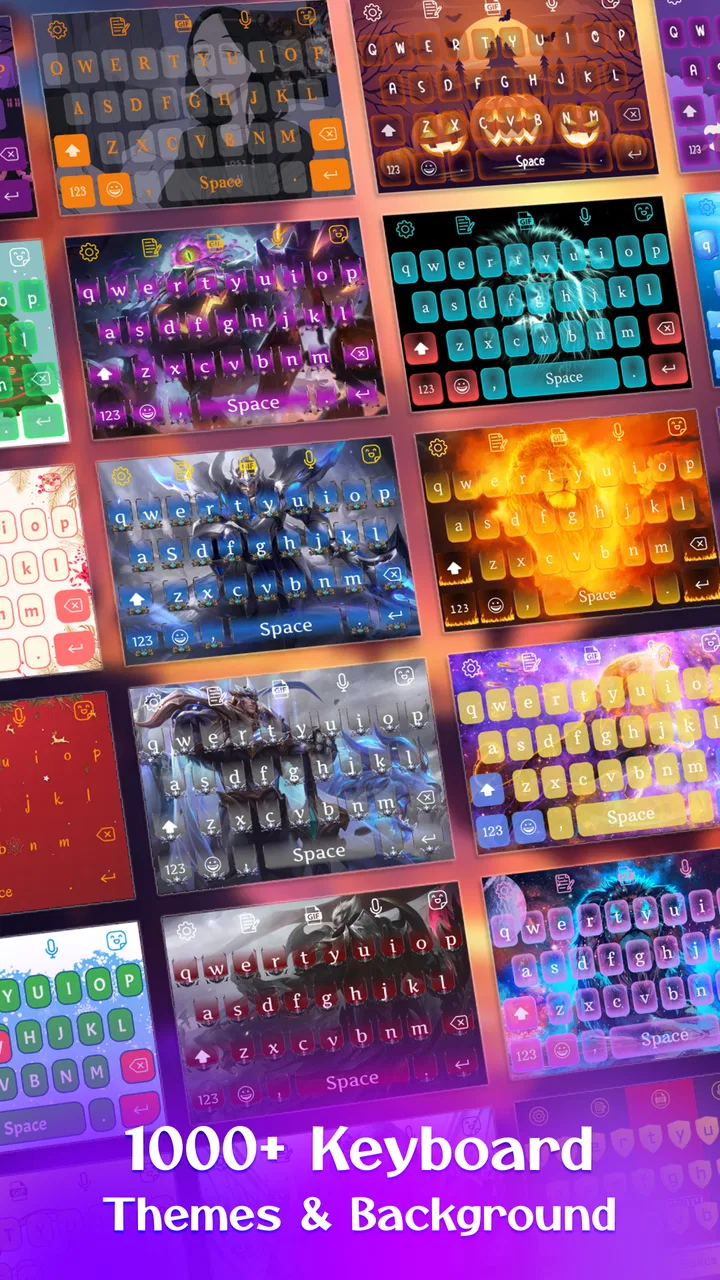
Keyboard Maker: Keyboard Theme
- 4.4
- Rating
- 10.00M
- Installs
- Free
- Price

 Analysis by App-foxy
I spent time with Keyboard Maker: Keyboard Theme as a personalization app, and its appeal is easy to understand: it lets you approach your Android keyboard as something you can style rather than simply accept as it arrives. The focus is not on replacing your messaging habits with a new social tool or adding a separate writing service. It is about making the keyboard feel more like yours.
That distinction matters. A keyboard is one of the most frequently used parts of a phone, yet many people only change it when they replace the entire keyboard application. This app, developed by BlueSkySoft, is aimed at users who want to experiment with the keyboard’s appearance and create a personal look. I found it most interesting when I treated it as a small design project: choose a visual direction, test it while typing, and decide whether the result still feels comfortable after the novelty wears off.
What the app actually offers for free
The app is free to install, which makes trying it a low-commitment decision. Its listing also includes optional in-app purchases ranging from $0.49 to $6.99 per item. I would therefore approach it as a free starting point with paid extras available, rather than assuming every creative option is included without charge. That distinction is useful before you begin designing a theme you may want to keep.
You May Also Like

 Blood Strike: 2.5 Anniversary
Blood Strike’s Loadouts Turn Every Drop Into a Tactical Gamble
A close look at Blood Strike’s custom loadouts: how fast access to signature weapons reshapes its battle royale rhythm, rewards preparation, and narrows the gap between fights.

 Pandora - Music & Podcasts
Pandora’s Music Is Easy to Start, but Harder to Recover
Pandora’s strength is its low-effort path from a seed to a station. Its weak spot is how much confidence it asks you to place in connection, setup, and quiet recovery.

 8 Ball Pool
 Is Built on Rivalries, Rematches, and Routine
A close look at the rivalries, rematches, shared routines, and unanswered safety questions that turn a quick pool match into a persistent mobile community.

 Samsung Music
’s Quiet Strength Is Playing What You Already Own
Its reach comes less from spectacle than from dependable access to a personal library. That simplicity is both the app’s strongest retention engine and its ceiling.

 AccuWeather: Weather Radar
AccuWeather Review: A Quick, Clear Forecast for Everyday Decisions
For everyday plans, the best forecast is the one you can understand quickly. AccuWeather makes rain timing, radar, and local conditions easy to act on, with a few trade-offs.

 Hill Climb Racing
Why Hill Climb Racing Still Turns Crashes Into One More Run
A tiny car, a bumpy hill and one more upgrade: Hill Climb Racing keeps resurfacing because its simple chaos makes every near-miss feel personal.
More From Our News Desk



The free entry point is one of its strongest advantages over paid personalization tools. You can see whether making a keyboard theme is genuinely enjoyable for you before spending anything. For a person who only wants a quick visual change, that may be enough. For someone who expects a large professional design package, the purchase range suggests that the experience may become more selective once optional items enter the process.
I also appreciate that the app is rated for Everyone. That makes it a reasonable choice for families looking for a visual customization tool, although younger users may still need help judging which keyboard settings and purchases are appropriate. The minimum operating-system requirement is Android 7.0, so it is not aimed only at recent phones. Compatibility is broad enough for people using older Android devices, provided their phone meets that requirement.
The current release is v63, and the app has been available since June 3, 2022. Those details give the product some useful context: this is not a brand-new experiment that appeared yesterday, but it is also not something I would choose because of a long history of specialist keyboard features. Its identity is clearly centered on theme creation and visual personalization.
How I would judge the paid value
Because the basic app is free and the optional items are relatively small purchases individually, the right question is not simply whether the app costs money. The better question is whether a paid element improves a theme I will actually use every day. If I am changing the keyboard once for a temporary mood, I would stay with the free experience. If I am building a look around a favorite color palette or a phone-wide visual style, a modest purchase can make more sense, but only when I can see exactly what it adds.
I would avoid buying several extras at once. The practical way to use this app is to create or test a design first, live with it during ordinary typing, and only then decide whether additional customization is worth paying for. That approach protects the main benefit of a free app: experimentation without pressure.
Creating a keyboard that feels personal
The most useful way to think about Keyboard Maker is as a visual layer for a familiar activity. I did not approach it expecting a new keyboard intelligence system or a replacement for every keyboard utility. I approached it as a way to make the typing surface match my preferences. That makes the result surprisingly personal, because small choices become visible every time I send a message, search the web, or enter a short note.
A good theme is not necessarily the brightest or most elaborate one. In my experience, the designs that remain pleasant are the ones that balance personality with legibility. A dark background can look polished, but it needs enough contrast for letters and symbols to remain easy to recognize. A colorful design can be fun, but too many competing shades may make the keyboard tiring during longer conversations.
One non-obvious advantage is that the creation process encourages you to notice how often you rely on visual grouping. Number keys, punctuation, space, and backspace all need to remain easy to locate. When a theme changes the overall appearance, I recommend checking those areas rather than judging the result from a static preview alone. A design that looks attractive before typing can feel awkward once your thumbs are moving quickly.
A practical everyday scenario
Imagine that I am preparing for a trip and want my phone to feel less generic without changing every application. I could use the app to create a keyboard that matches the colors of my travel wallpaper. Before leaving, I would test it while writing a normal message, entering an address, and correcting a typo. That short routine reveals more than staring at a theme screen: it shows whether the keys remain readable, whether the background distracts me, and whether the design still feels comfortable when I am in a hurry.
Another useful scenario is separating personal and work moods. I might prefer a subdued keyboard during working hours and a more expressive look in the evening. The value here is not productivity in the traditional sense; it is the small feeling of control that comes from shaping an object I use repeatedly. For users who care about matching wallpapers, icons, and colors, that can be more satisfying than downloading a random premade theme.
There is also a helpful trial-and-error workflow. I would begin with a restrained design, use it for a day, then adjust only one visual element at a time. Changing everything together makes it difficult to understand what improved or caused discomfort. This slower method is especially useful for people who are sensitive to contrast or who type frequently.
Where it differs from ordinary keyboard alternatives
The usual alternative is to stay with the keyboard already installed on the phone. That option is often faster and more predictable, especially for someone who does not care about appearance. Another alternative is to install a large third-party keyboard known primarily for typing assistance, language tools, suggestions, or broader settings. Those keyboards may be better choices when writing performance and advanced input functions matter more than personal design.
Keyboard Maker: Keyboard Theme occupies a narrower but clearer space. Its reason to exist is the act of creating a look. I would choose it over a standard keyboard when visual ownership matters, but I would not automatically choose it over a feature-heavy keyboard for someone who wants the strongest writing aids. The app makes sense when customization is the deciding factor, not when themes are merely a minor bonus.
This trade-off is important because a beautiful keyboard is still part of a typing system. If your priority is multilingual typing, specialized accessibility support, extensive prediction controls, or a particular input method, you should compare those needs before switching your attention to appearance. I would not recommend changing a dependable keyboard solely for a theme unless the visual benefit is genuinely important to you.
Small choices that make the result better
My first tip is to test readability in more than one setting. A theme that looks clear indoors may feel different in bright daylight or at night. I would check a short message, a password field where appropriate, and a search box, because each situation changes how quickly I look at the keys. The goal is not to make every key stand out dramatically; it is to make the important keys easy to find without visual strain.
My second tip is to design around the phone rather than in isolation. If your wallpaper is busy, a calmer keyboard can prevent the screen from feeling crowded. If your wallpaper is plain, a stronger keyboard accent may add character without overwhelming the interface. This is where the app delivers more value than a random theme download: the design can be considered as part of the phone’s overall appearance.
My third tip is to treat paid items as finishing touches, not as a reason to start. Use the free experience to decide whether you enjoy the creative process and whether the finished keyboard survives real use. A purchase is easier to justify when it solves a specific design problem, such as completing a consistent look, rather than when it is made simply because an option is visible.
My fourth tip is to keep a practical fallback in mind. If a custom design makes typing slower or causes you to misread keys, appearance has become a cost rather than a benefit. I would switch back temporarily, revise the theme, and test again instead of forcing myself to tolerate it. Personalization should make the phone more comfortable, not turn every message into a small visual challenge.
Who will get the most from it
This app is a strong fit for people who enjoy customizing their phones but do not necessarily want to replace every part of the Android interface. It is also suitable for users who see the keyboard as an overlooked design area. If you already spend time choosing wallpapers, icon colors, or lock-screen styles, creating a matching keyboard is a natural extension of that habit.
It can also work well for someone who wants a simple creative activity with an immediate result. You do not need to redesign an entire phone theme to see the effect. The keyboard is small enough to experiment with, yet visible often enough that a successful design feels worthwhile. Since the app is free to begin with, curious users can explore without committing to a purchase.
I would be more cautious about recommending it to people who are completely satisfied with their current keyboard. If your main concerns are typing speed, prediction quality, language coverage, voice input, or specialized accessibility controls, a dedicated keyboard application may serve you better. The app’s appeal depends on caring about appearance and enjoying the process of adjusting it.
I would also skip it if you dislike repeated visual tweaking. The strongest results come from testing and refining rather than accepting the first design. Someone looking for one tap, one permanent answer may find the creative angle less useful than a conventional ready-made theme. The free price removes much of the financial risk, but it does not remove the time needed to find a look that works.
What to consider before changing your keyboard
Before making the switch, I would decide what matters most: matching the phone’s style, improving visibility, or simply trying something different. That decision helps prevent a common mistake, which is choosing a theme because it looks impressive in a preview and then discovering that it is tiring during real typing.
I would also consider how often I type. Someone who sends messages all day will notice contrast, spacing, and visual noise much more than someone who uses the keyboard occasionally. Heavy users should be stricter during testing. Occasional users can afford to prioritize personality because the keyboard will not be under constant visual demand.
For families, the Everyone rating makes the app approachable, but I would still keep an eye on optional purchases. Free access is useful for trying the editor, while the listed paid items mean that continued customization can involve spending. Setting a clear limit before exploring is a sensible habit, especially when several small purchases could accumulate.
My verdict on the value
Keyboard Maker: Keyboard Theme earns its place as a focused personalization app rather than a universal keyboard replacement. BlueSkySoft has aimed it at the part of the experience many standard keyboards treat as secondary: making the typing surface look like it belongs to you. The free entry point is the main value proposition, while optional purchases should be judged individually and only after a design proves useful in daily life.
The app has reached a substantial audience, with an average rating of 4.4 from around 103 thousand ratings and over 10 million installs. Those figures suggest that the concept has broad appeal, but they do not change the central trade-off I experienced: the app is valuable when visual customization matters to you, and much less valuable when keyboard functionality is your first concern.
My recommendation is to try it if you enjoy matching your phone’s appearance or want a more personal keyboard without paying at the start. Spend time testing contrast, punctuation, and long typing sessions before considering extras. I would skip it in favor of a more feature-oriented keyboard if you need advanced writing tools or are already happy with your current setup.
For the right user, the result is a small but satisfying improvement that appears throughout the day. The best reason to use this app is not novelty; it is the control it gives you over a part of the phone you constantly touch. That makes the free trial worthwhile, while the paid side is best treated as optional polish rather than a requirement for a useful experience.
FAQs for Keyboard Maker: Keyboard Theme
01What features does Keyboard Maker: Keyboard Theme offer?
Keyboard Maker: Keyboard Theme allows users to customize their mobile keyboard with a variety of themes, fonts, and color schemes. Users can create their own themes, choosing from a wide range of backgrounds and key styles. The app also offers features like auto-correction, emoji suggestions, and multilingual support, enhancing both aesthetics and functionality.
02Is Keyboard Maker: Keyboard Theme free to use?
Keyboard Maker: Keyboard Theme is available for free, but it also offers in-app purchases for additional features and premium themes. While the free version provides a robust set of customization options, opting for the premium version unlocks exclusive themes and removes ads, providing a more seamless experience.
03How easy is it to customize the keyboard with this app?
Customizing your keyboard with Keyboard Maker: Keyboard Theme is straightforward and user-friendly. The app features an intuitive interface where you can select themes, change fonts, and adjust colors with just a few taps. Even those with minimal technical skills can easily navigate the app and personalize their keyboard to fit their style.
04Does Keyboard Maker: Keyboard Theme support multiple languages?
Yes, Keyboard Maker: Keyboard Theme supports multiple languages, making it a versatile choice for users around the globe. It includes a variety of language packs and offers predictive text and auto-correction in several languages, ensuring accurate and efficient typing no matter which language you choose.
05Will using Keyboard Maker: Keyboard Theme affect my device’s performance?
Keyboard Maker: Keyboard Theme is designed to be lightweight and efficient, minimizing its impact on your device’s performance. While it enhances your keyboard’s appearance and functionality, the app is optimized to ensure smooth operation without significant battery drain or lag, even on older devices.
Pros
- Highly customizable themes available.
- User-friendly interface for easy setup.
- Supports multiple languages efficiently.
- Regular updates with new features.
- Minimal impact on device performance.
Cons
- Contains in-app purchases for themes.
- Limited free theme options available.
- Occasional ads can be intrusive.
- May require permissions for full use.
- Some themes may not support emojis.

Keyboard Maker: Keyboard Theme
Gallery